Showing posts with label Source controll branching. Show all posts

Tuesday, 29 September 2009

How to keep infopath form in source control

Microsoft infopath form saved with .xsn extension. This is a binary format. If you add a xsn file to source control, you will have record of different version of the form, but you won't be getting the change details.

This can be solved easily by doing it little bit differently. xsn files are basically cab file. And it contains lots of xml, xsd, image and other files. The good thing is Infopath provides a option to save files in its source form, i.e. instead of one big xsn(cab) file, you can save all internal files separately in one location. In that case most of those files are text file. And source control will be able to track all changes in the file.
Save As Source Files option available in the File menu as shown in the image.
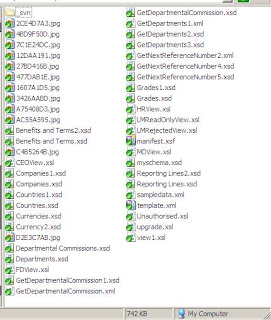
And it looks like the image in right.
number of files and types depends on the content of the form. It will always have a manifest file(xsf). Right Click on the manifest file and choose design to open the form in design mode.
There will be xsd files for every data connection/data types. There will be one xsl files for each view, and all images displayed in the form etc.

This makes version controlling worthwhile. Doing this you can merge between branches meaningfully.

One last thing whenever this form is published it will be published as .xsn file in its publish location.

Infopath forn and Branching


Combination of Microsoft Infopath form and source control could turn into a editing hell, specially if that involves branching and merging.
Infopath forms keeps track of where it has been published before and where from it was published. Therefore if the form is moved it gives warning like the one bellow:
This is exactly the same thing happens when source is branched from trunk and is being opened from branch.
Click okay and form is displayed in editable mode. So far it's all right. But when the from is being published again from branch infopath form will ask for saving the file before it can be published even if there has not been any change in the form.
Depending on the user preference, if the always save checkbox is ticked earlier, this dialog box will not appear, instead it will open the file save dialog directly.
That's where the confusion is. In regular publish from does not display the save as box. User can easily confuse about whether that is the publish location it's talking about or the source location.
Infact that's what happened to me. I save the file to it's publish location and then publish it to the same location.
The funniest thing is I've lost all my work. It simply published and stored the original file. All changes are overwritten.

To avoid such loss , I recommend, any time if you move a infopath form do the following thing first:
  • Save the form again to it's new source, make sure path is selected correctly
  • publish to the correct location

I hope this writing will help some one from loosing their days work, just because infopath form doesn't like to move around.